

Kundra
Be a part of Nullsto's Growth ;)
Staff member
Moderator
Nullsto Lover
GiveAway Master
Trusted Uploader
- Joined
- Sep 16, 2022
- Messages
- 4,218
- Reaction score
- 6,567
- Points
- 193
Open the right browser at the right time
Open source, cross platform, and free
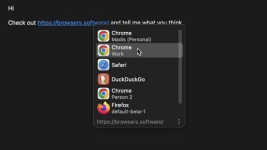
As you can see, “Browsers” is a simple program that works on all operating systems (Windows, Mac, Linux) and allows you to choose the browser in which you want to open links.You may ask, what is the point? Let me give you an example. If you have ever worked with Tor, you know how difficult it is to open onion links. You have to manually copy them (Ctrl+C) and paste them (Ctrl+V) to open them in the Tor Browser.
Or suppose you have several different browsers or profiles for different tasks. To open a link in your favorite browser, you have to click on it several times and skip several windows.
“Browsers” solves this problem easily. This program replaces the system’s default browser and captures links before they are opened, allowing you to choose the browser in which you want to open them.
Key features:
- Open source: This means that anyone can see and modify the code.
- Built by the FOSS community: This means that it was built by a group of volunteer developers and has no ads or tracking.
- Works on Windows, Mac and Linux: This means you can use it on any system.
- Compatible with all browsers: This means you can work with this program regardless of the browser you are using.
- Supports Chromium and Firefox browser profiles: This means you can manage your different browser profiles.
- Supports Firefox containers: This means you can open links in different Firefox containers.
- Ability to set rules for links: This means you can specify which links will be opened using which browser.
It really helps a lot in daily tasks.

