


- Joined
- Apr 26, 2023
- Messages
- 186
- Reaction score
- 126
- Points
- 43
Hey there,
Did you know that you can use keywords to communicate with Bing Ai ?
Keywords are special words or phrases that can trigger specific actions or responses from the chatbot.
I will show you how to make your conversations more engaging, informative, and fun.
Usage example - not mandatory, you use them in any way you like !
{prompt} ;keyword1;keyword2;
A
Did you know that you can use keywords to communicate with Bing Ai ?
Keywords are special words or phrases that can trigger specific actions or responses from the chatbot.
I will show you how to make your conversations more engaging, informative, and fun.
Usage example - not mandatory, you use them in any way you like !
{prompt} ;keyword1;keyword2;
A
- act_as - roleplay
- code - generate in specific language
- map an array of 10 vegetables ;code;javascript;comment
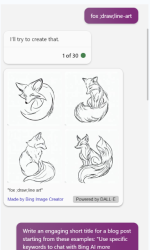
- draw - draw an image
- fox - draw a line art image of a fox
- depicted - describe the picture
- "What is depicted in this picture?"
- emoji - respond in emoji style
- wolf - respond with an emoji representing a wolf
- expert: make the conversation more detailed and complex. Useful for technical content.
- "I want you to act as an expert in Python programming with five years of experience."
- explain - explain a chosen topic as if to a child
- "Explain the concept of gravity to me as though I am six years old."
- force_search - force search for a query
- "I want to search for this."
- hi or hello - say hi to the bot
- "Hello."
- how_to - get instructions for a specific task
- "How to make a cake?"
- let's_play - let's play a game
- tic-tac-toe - let's play tic-tac-toe
- no_search - don't search for the query
- "I don't want to search for this."
- outline - generate an outline for specific content
- "I want to write an outline for this: text or URL."
- only - output results in a specific format
- "Output the result only as code."
- "Output the result only as emoji."
- photograph - use with draw keyword to get better image results
- "Describe a beautiful photograph of a dog."
- quiz - define a quiz
- "What is the capital of France?"
- similar_to - find similar things
- "Find things similar to an apple."
- search_query - perform a web search on any topic
- "I want to search for this."
- summarize - summarize an article or webpage into a bullet point list
- "Summarize this article or webpage into a bullet point list."
- translate - translate a word or sentence
- "Translate 'hello world' to French."
- topic - define a topic
- "I want to talk about this: text or URL."
- "I want to talk about environment protection as the topic."
- table - create a table for a specific topic
- "I want to create a table for this."
- vs - compare two things
- "Compare apple and orange."
- want - ask Bing Chat to ask questions to understand what you want
Enjoy