


Kundra
Be a part of Nullsto's Growth ;)
Staff member
Moderator
Nullsto Lover
GiveAway Master
Trusted Uploader
- Joined
- Sep 16, 2022
- Messages
- 4,080
- Reaction score
- 6,365
- Points
- 193
How to add cookies editor extension into your browser
Go to the browser web store (I am using Chrome web browser if you are using another browser just open your browser’s web store). On the web, store search for “cookie editor” and choose the extension shown in the below image.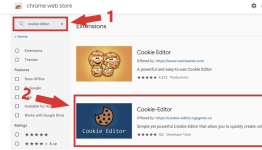
- Save
Now click on add to chrome button (Add to your browser name button) that is available just next to the cookie editor.
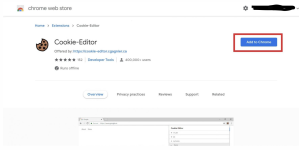
- Save
In the second step, we need to insert cookies into your browser.
So now let’s see how to insert cookies in your browser using the cookie editor.
How to insert cookies into the browser
First of all, open the website.After opening the website click on the cookie editor extension that we installed in our browser (available on the top right side of your browser).
Now click on the delete all button to delete the existing cookies and after that click on the insert button to insert the working cookies that we copied in the first step.