
-
Nullsto Rules must be read before making a post, otherwise you will get permanent warning points or a permanent ban.
Nullsto Forum provides CLEAN and SAFE resources. You can use them for development and testing if you are on Windows and have an antivirus that alerts you about a possible infection: It is a false positive since every script is double checked by our experts. While downloading a resource, we recommend that you add Nullsto to your trusted sites/sources or temporarily disable your antivirus. "Enjoy your presence on Nullsto"
You are using an out of date browser. It may not display this or other websites correctly.
You should upgrade or use an alternative browser.
You should upgrade or use an alternative browser.
Tricks HOW TO USE MIDJOURNEY, DALL AND OTHER CHAT GPT FOR COMPLETELY FREE WITHOUT PAYMENY
- Thread starter neilace3
- Start date
- Status
- Not open for further replies.
View attachment 1613View attachment 1610View attachment 1608 Just follow some of the screen shot and copy and paste the script And save it. Open Poe.com login and click the explore button.you will have access to lot of aiView attachment 1611View attachment 1612
nothing hard there
You can do
Just install extension
Right click and click new userscript
Copy the script inside .txt bellow and paste. Save
Login poe.com by the left side click explore
All ai will be available
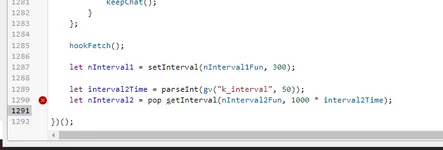
I got this after importing the code, what do i do please?
I love nullsto!Register Poe and Download tamper monkeychrome or Firefox extension
I will provide script code to make it work for all AI
If you need tamper monkey script for Poe
Type I love nullsto

Simran529
New member
- Joined
- Jul 8, 2023
- Messages
- 16
- Reaction score
- 8
- Points
- 3
I love nullsto!
Not working broView attachment 1618
I got this after importing the code, what do i do please?
gdrivehub4
New member
- Joined
- Jun 29, 2023
- Messages
- 16
- Reaction score
- 2
- Points
- 3
I love nullstoRegister Poe and Download tamper monkeychrome or Firefox extension
I will provide script code to make it work for all AI
If you need tamper monkey script for Poe
Type I love nullsto
gdrivehub4
New member
- Joined
- Jun 29, 2023
- Messages
- 16
- Reaction score
- 2
- Points
- 3
installed the script properly, tried both from the txt file as well as github of xcarwin but still it is not working on poe.com. The script is showing in tampermonkey as enabled but on clicking tampermonkey ext. icon on poe.com, the script is not being shownYou said not working because you don’t know how to install it! I advise you to check on YouTube how to install script to tamper monkey maybe that will help
worldofwar
New member
- Joined
- Aug 20, 2023
- Messages
- 1
- Reaction score
- 0
- Points
- 1
I love nullstoRegister Poe and Download tamper monkeychrome or Firefox extension
I will provide script code to make it work for all AI
If you need tamper monkey script for Poe
Type I love nullsto
purpledosa
New member
- Joined
- Aug 21, 2023
- Messages
- 2
- Reaction score
- 0
- Points
- 1
I love nullsto


I love NullstoRegister Poe and Download tamper monkeychrome or Firefox extension
I will provide script code to make it work for all AI
If you need tamper monkey script for Poe
Type I love nullsto
irandasofi
Member
- Joined
- Mar 15, 2023
- Messages
- 28
- Reaction score
- 2
- Points
- 8
i love nullsto
- Status
- Not open for further replies.
Similar threads

- Replies
- 0
- Views
- 484

- Replies
- 0
- Views
- 537
- Replies
- 161
- Views
- 9K